Geek-o-meter: 1 2 3️⃣
The Shortcut Also Builds the Project Around the Work
In the previous posts, I wrote about the front end of my project Shortcut: first collecting the project metadata, then using it to create a task structure in OmniFocus and a project note in Obsidian.
This final part is more physical.
Once the project exists as data, actions, and notes, the Shortcut also creates the working environment around it: the folder structure in Dropbox, a copied Sibelius template, and a calendar event spanning the project’s actual dates.
This is the part that makes the project feel real.
Building The Folder structure
The first job is straightforward: the Shortcut creates the project folder in Dropbox using the naming convention established earlier. From there, it builds the internal folder structure I know I will need.
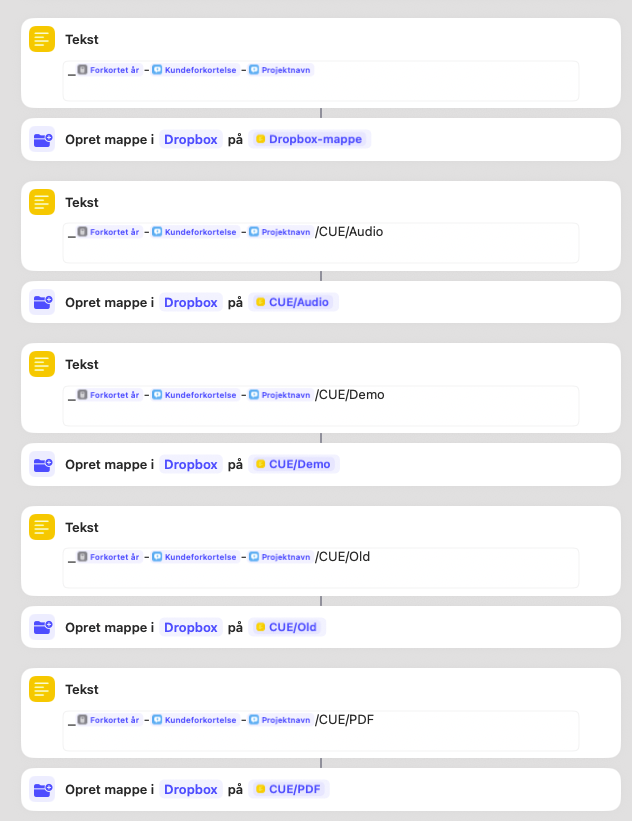
In the screenshot above, the Shortcut is assembling a set of standard paths and creating them one by one. The main project folder is created first, followed by the internal working folders inside CUE: Audio, Demo, Old, and PDF.
That structure reflects the way I tend to work on real scoring projects. Audio references need a home. Demo exports need a home. Superseded material needs somewhere to go without being deleted in a fit of false confidence. And PDFs need to be easy to find quickly, especially when time is short and memory becomes a speculative art form.
The next screenshot shows the client-facing side of the same setup.
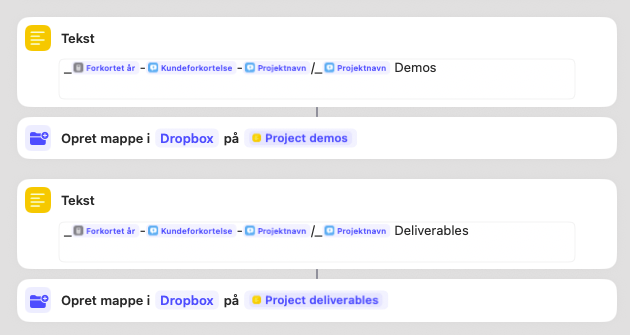
In addition to the internal cue folders, the Shortcut creates dedicated folders for demos and deliverables. That separation is deliberate. It helps distinguish between material I am still working on and material that is intended to leave the building.
This is one of those small structural decisions that saves time later. It reduces the chance of sending the wrong file, storing things inconsistently, or wasting time asking where something ought to live. The folder structure may not be glamorous, but a lot of deadline stress is really just misplaced geography.
Copying The Sibelius template
Once the folders exist, the Shortcut also copies and renames my Sibelius template and adds a conspicuous “CHECK HOUSE STYLE” note beside it.
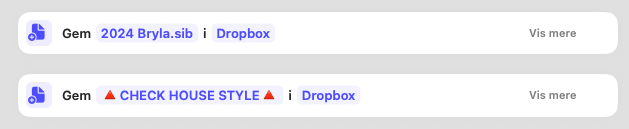
That second file includes hook links to notes about different collaborators’ preferences. One of the easiest mistakes in this line of work is to assume that every project should begin from your own defaults. In reality, many projects come with their own expectations for score order, fonts, spacing, bar numbers, staff size, part layout, naming conventions, and all the other details that quietly determine whether a package feels professional or slightly cursed.
So the Shortcut does two things at once: it gives me a starting point, and it reminds me not to trust it blindly.
That is a useful pattern in general. Templates are excellent servants and terrible emperors.
Adding The Project to the calendar
The final step in this section is temporal rather than structural.

Using the start date and deadline collected earlier, the Shortcut creates a calendar event covering the life of the project.
This matters for two reasons.
First, it makes the project visible. It is no longer just a folder in Dropbox or a task list in OmniFocus. It now occupies time, which is ultimately what all projects are competing for.
Second, it helps me think in spans rather than isolated deadlines. A project is not just due on a certain day. It has a beginning, a middle, and a period in which it will shape the rest of my schedule. Putting that into the calendar early helps with planning, prioritization, and avoiding the very optimistic fantasy that multiple overlapping projects will somehow arrange themselves out of politeness.
They never do.
Why I Automate This part
None of these steps is difficult on its own.
I could create the folders manually. I could duplicate the template manually. I could add the calendar event manually.
But that is exactly the kind of setup work that becomes annoying through repetition. Not hard enough to demand full attention, not trivial enough to disappear, just irritating enough to nibble away at the beginning of every project.
So I let the Shortcut do it.
The real value is not speed in the dramatic sense. It is consistency. Every project begins with the same basic architecture: a folder structure, a working template, and a calendar presence. That means less forgetting, less naming drift, less rummaging, and fewer little administrative decisions stealing attention before the work has even started. That is the larger principle behind the whole system. The Shortcut is not there to make me feel clever. It is there to make the project start cleanly.
And, at least in my world, that is a meaningful part of project management: not just keeping track of work once it is underway, but giving it the right structure before it begins.
If you would like to read the earlier posts in this little series, the first one covers how the Shortcut collects project data, and the second looks at how that data feeds OmniFocus and Obsidian.