Project Management 106
Geek-o-meter: 1 2 3️⃣
The Next Step: Turning Project Data Into Action
In the previous post I wrote about the first stage of my project Shortcut: collecting the project’s metadata.
That is the quiet part. Dates, abbreviations, project name. Useful, necessary, and not exactly what Hollywood makes posters about.
But the real payoff comes in the next step.
Once the Shortcut knows what the project is, it can start doing something with that information. In my case, two of the next destinations are OmniFocus and Obsidian: one for action, one for context.
That distinction matters. OmniFocus is where the project becomes a sequence of tasks. Obsidian is where it becomes a body of notes. Same project. Different job descriptions.
OmniFocus: Turning a Project into motion
The first screenshot shows one of the Shortcut’s text-building steps before the result is handed off to OmniFocus.
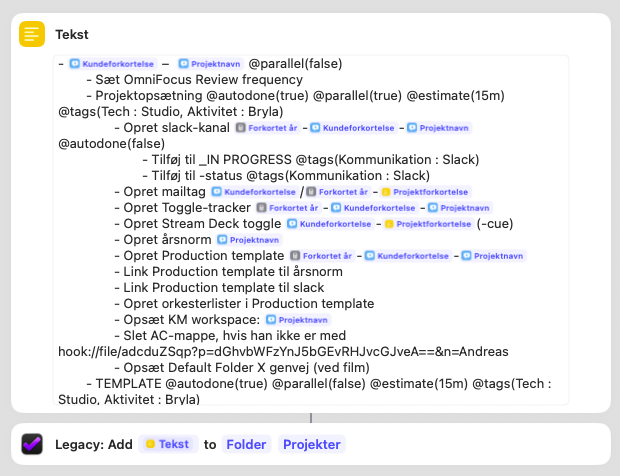
What is happening here is not especially glamorous, but it is extremely useful: the Shortcut assembles a TaskPaper template using the data collected earlier.
That template includes the new project name at the top, and underneath it a predefined list of tasks I often need when starting a project. Things like reviewing the OmniFocus setup, opening a Slack channel, creating a mail tag, setting up Stream Deck toggles, opening the production template, linking things together, preparing a cue folder, and so on.
In other words, I am not creating an empty project. I am creating a project with momentum already built into it. This is an important difference.
A blank project in a task manager looks tidy, but it still leaves me with the cognitive job of deciding what “starting” means. The Shortcut removes that step by giving me a repeatable launch sequence. It turns project setup from a vague intention into a concrete checklist.
That checklist is then added to my Projects folder in OmniFocus, where it is ready to be processed, adjusted, and acted on. Not every task will apply every time. That is fine. The point is not to predict the future perfectly. The point is to avoid starting from zero.
Obsidian: Turning a Project into a place for thinking
The second screenshot shows the Obsidian side of the same process.
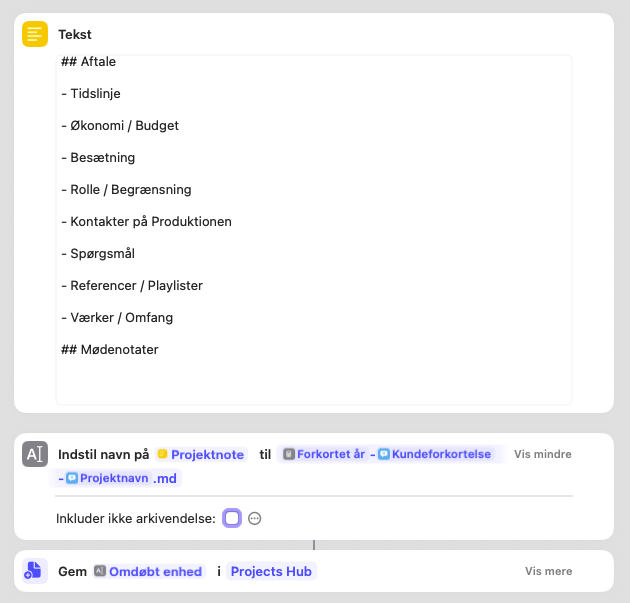
Here, the Shortcut creates the skeleton of a project note. It is not fancy. It does not need to be.
The note begins with a simple structure: agreement, timeline, budget, team, role or limitations, contacts on the production, open questions, references or playlists, works or scope, and meeting notes.
Once that note template has been generated, the Shortcut renames it according to the project naming convention and saves it into my Projects Hub in Obsidian.
So instead of opening Obsidian and staring into the void, I already have a dedicated note in the right place with the right name and the right headings.
That means the project has somewhere for the messy but important information to live: the unclear phone number, the budget caveat, the playlist someone sent at midnight, the note about who actually signs off on revisions, the practical detail that will absolutely matter later and definitely not live in my memory for free.
Action And Context Are Different systems
This is really the deeper principle behind the Shortcut. A project does not just need folders. It does not just need dates. And it definitely does not just need optimism.
It needs at least two different kinds of structure:
a system for what needs to be done
a system for what needs to be remembered
That is why the same metadata gets reused in multiple places. The Shortcut is not duplicating work for the sake of it. It is feeding the right information into different systems with different purposes.
OmniFocus answers: what is next?
Obsidian answers: what do I know about this?
Those are not the same question, and projects get much easier when both have a home from the start.
Why This matters
The value of this setup is not that it saves a dramatic amount of time in one go. It is that it removes a long trail of tiny setup decisions.
Without the Shortcut, I would have to:
create a project manually in OmniFocus
decide what starter tasks belong there
create a note in Obsidian
name it consistently
add the headings I always end up needing anyway
remember where to store it
avoid spelling the project differently across systems
None of that is hard. It is just cumulative friction.
And cumulative friction is one of the main reasons project admin becomes more tiring than it has any right to be.
So this part of the Shortcut does something simple but valuable: it gives each new project both a task structure and a thinking structure before the real work begins.
That way, when the project starts moving, I am not improvising the infrastructure underneath it.