Project Management 105
Every Project Starts With the Same Questions
Geek-o-meter: 1 2 3️⃣
When I start a new project, I do not begin by making folders. I begin by collecting data.
That may sound suspiciously like the least glamorous sentence ever written on a blog about creative work, but it turns out to be one of the most useful parts of my whole system.
I use a macOS Shortcut to initialize new projects. Before it creates anything, it asks for the project’s basic metadata: start date, deadline, client abbreviation, and project name. That first step is doing more work than it may seem.
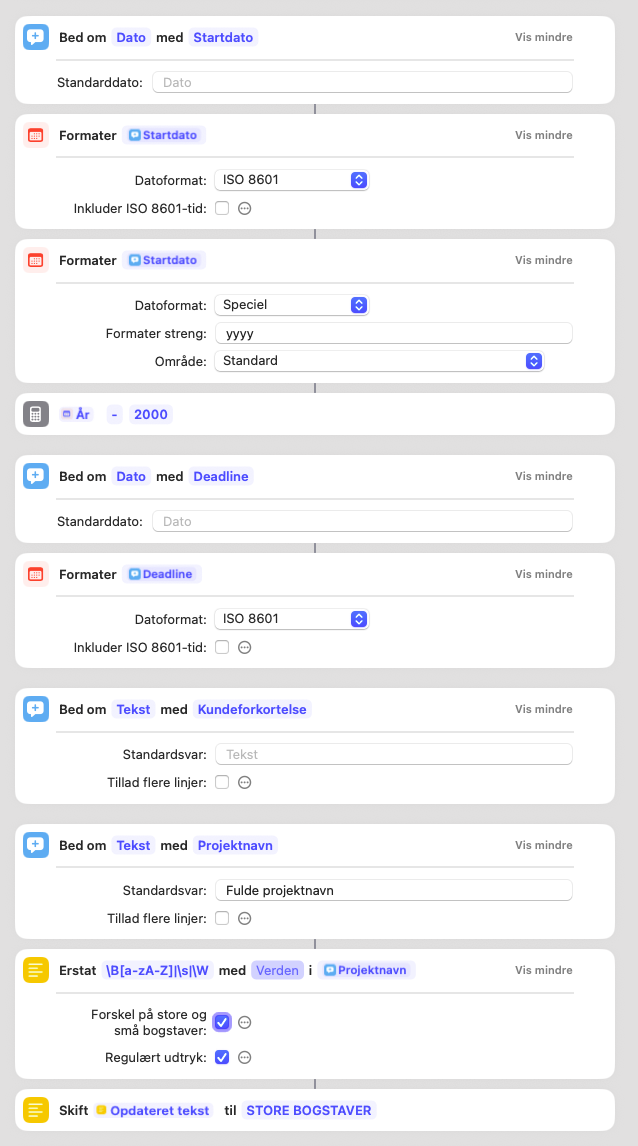
The Shortcut is in Danish, because so am I. A few useful translations: “Bed om” = “Ask for”, “Formater” = “Format”, “År” = “Year”, “Kundeforkortelse” = “Client abbreviation”, “Projektnavn” = “Project name”, “Tekst” = “Text”, “Datoformat” = “Date format”, “Erstat” = “Replace”, “Opdateret tekst” = “Updated text”, “Skift” = “Convert”, “Store bogstaver” = “Uppercase”, “Regulært udtryk” = “Regular expression”, and “Forskel på store og små bogstaver” = “Case sensitive”. This first section collects and standardizes the project data before the rest of the workflow begins, including using regex to clean the project name and convert it to uppercase where needed.
This post is about that part specifically: the Shortcut’s data collection. Because the point is not simply that I automated folder creation. The point is that I only want to enter project information once.
Each of those fields gets used differently downstream. The start date and deadline feed the calendar. The year becomes part of the naming convention. The client abbreviation is useful for compact file names. The full project title belongs in places where I actually want to read normal words like a civilized person. In other words, the same project needs slightly different versions of itself depending on whether it is heading into Finder, Obsidian, OmniFocus, or the calendar.
So the Shortcut starts by asking the boring questions upfront.
Once that data is in place, everything else becomes easier. The project can be named consistently. The folder structure can be generated automatically. Calendar entries can be created without retyping anything. Notes can open in the correct location. And perhaps most importantly, I do not have to make the same small decisions over and over again.
That repeated re-deciding is where a surprising amount of friction lives.
Not in the orchestration. Not in the notation. Not even in the deadline panic. In the tiny moments before the real work begins, where you ask yourself: what did I call this project again, which abbreviation am I using, what format does this app need, and why have I now typed the same title four times into four different systems like a very inefficient human API.
So this first stage matters.
The Shortcut does not begin with output. It begins with structured input. That is what makes the rest of the workflow reliable.
And that, I think, is the more useful lesson. Good project management is often less about organising finished work and more about defining clean information at the start. If the inputs are messy, every downstream system becomes messier with them. If the inputs are clear, the rest of the setup can happen quickly and consistently.
This is why my Shortcut asks for dates separately. It is why the client abbreviation is its own field. It is why the project name gets cleaned up and standardized before anything else happens. I am not filling out a form for the sake of it. I am building a small packet of project metadata that the rest of my system can use.
The folders come later, but the questions come first.